

Is There Mobile Signal on Mount Batur? Phone Reception, Internet and Offline Tips
It is easy to assume your phone will work everywhere in Bali. You use it for maps, messages, photos, bookings, translations and, occasionally, checking whether the sunrise is actually happening or whether the clouds are simply being dramatic. But what happens when you take that phone up Mount Batur before dawn?
The practical answer is to treat mobile reception as something that may vary, not something to depend on. Signal can differ with your mobile provider, exact position, terrain, weather and network conditions. You may have a usable connection in one area and a weak or unavailable signal a short distance away. Do not plan your trek around being able to stream, upload photos or make a call from every viewpoint.
This guide explains what to expect from phone reception around Mount Batur, how to prepare your device, why offline maps are useful, and how to stay in contact with your group without turning a sunrise hike into a search for Wi-Fi.
Does Mount Batur have mobile signal?
There is no reliable one-size-fits-all answer for every part of Mount Batur. Kintamani is a populated highland area with roads, villages, accommodation and visitor facilities, but reception on the mountain can be different from reception in a town or beside a main road. The caldera landscape, slopes and the exact location of a viewpoint can affect how well a phone connects to a mobile network.
Some visitors may find that their phone works in parts of the wider Kintamani area, while others experience slow data, intermittent bars or no usable connection at certain points. Even two people standing together may have different results because they use different networks or devices. A signal icon is not a promise that a webpage, map or message will load quickly.
For that reason, it is better not to publish a guaranteed coverage claim for a particular summit, trail section or viewpoint. Network coverage changes as operators improve their infrastructure, and the experience can vary by provider. If you need a current answer for a specific SIM card, check the coverage information from your mobile operator and ask locally before the trek.
Why phone reception can change around the mountain
Terrain affects radio signals
Mobile networks rely on radio signals between your phone and nearby network equipment. Hills, ridges, slopes and the shape of the caldera can affect the path between your device and a cell site. A location with a clear line towards network equipment may perform differently from a spot behind a ridge or down a slope.
This is one reason a phone can show reception during the drive and then lose it after you move to another area. It does not necessarily mean your SIM card has stopped working. The physical landscape is part of the picture.
Different providers can give different results
Indonesia has several mobile operators, and their coverage footprints are not identical. A local SIM that works well around your hotel may not perform the same way at a remote viewpoint. Travellers using international roaming may also connect through a partner network, which can affect the experience.
If staying connected matters to you, check your provider’s coverage map before travelling and ask your accommodation or tour operator about recent local experience. Treat this as useful guidance rather than a guarantee. Coverage maps are broad planning tools, not a promise of signal at an exact rock, trail bend or photo spot.
Network congestion and weather can also matter
Performance is not only about whether your phone displays signal bars. Network congestion, maintenance, device settings and local conditions can affect data speed. At popular visitor locations, several people may be trying to use the same network at once. A phone may be technically connected but still struggle to load a large file or upload a video.
Weather can change the overall experience outdoors, but it is not useful to blame every reception problem on clouds. Terrain, network design, provider coverage and congestion are more practical factors to consider. The sensible approach is to prepare for limited connectivity whatever the forecast says.
Will WhatsApp, Instagram and Google Maps work?
They may work when your phone has a stable data connection, but do not assume every app will work throughout the trek. Messaging apps need a connection to send and receive new messages. Instagram, TikTok and other social platforms usually need a stronger and more consistent data connection, especially when uploading photos or videos.
Google Maps can be prepared for offline use in advance. This is especially useful for getting to the general Kintamani area or finding your accommodation after the activity. Google explains that downloaded offline maps can guide you when the connection is slow or unavailable, provided the route is covered by the saved map. Some features, such as live traffic and alternative routes, will not be available offline. See the official Google Maps instructions for downloading offline maps.
Remember that an offline map is a navigation backup, not a substitute for a guide or permission to explore unmarked mountain paths. Mount Batur has volcanic terrain, uneven ground and routes that can be difficult to identify in darkness. Follow your guide and the agreed route rather than using a phone map to improvise a shortcut.
How to prepare your phone before leaving your hotel
Download an offline map of the area
Before leaving your accommodation, open Google Maps while you have Wi-Fi or mobile data. Search for the area you need, open the offline maps option and download a map that covers your route and the places you may need afterwards. Include your accommodation, the meeting area or starting point, and a wider section of Kintamani if the download area allows it.
Google’s help page provides instructions for both Android and iPhone. On many devices, you can open your Google Maps profile menu, choose Offline maps, select the area and download it. Menu labels can vary slightly by app version. Make sure the download has completed before you leave Wi-Fi.
Offline driving directions can be useful for the road journey, but offline maps have limitations. Google notes that walking, cycling and public transport directions are not available offline in the same way, and live traffic information is unavailable. Do not rely on the downloaded map to guide you up the trekking trail.
Save important details as screenshots
Take screenshots of your booking confirmation, pickup time, meeting point, accommodation address and the contact number supplied by your operator. Save the information somewhere easy to access without opening an email or messaging app. A screenshot is simple, low-tech and surprisingly useful when the mobile network decides to take a break.
If your driver or guide has sent instructions through WhatsApp, keep the conversation available and save the key details. Do not assume you will be able to download an attachment or open a new link once you are away from a reliable connection.
Charge your phone and consider a power bank
Cold early-morning conditions, camera use, screen brightness and navigation can all contribute to battery drain. Charge your phone fully before going to bed. If you plan to take many photos or use your phone for a long journey, bring a small power bank and a suitable cable.
Keep your phone somewhere secure and accessible. A zipped pocket is more sensible than carrying it loosely in your hand while walking over uneven volcanic ground. If you use a wrist strap or phone lanyard, check that it does not interfere with your movement or trekking pole.
Set up your phone for the early start
Download any music, podcasts or translation files you want before leaving. Set your alarm and make sure the phone is not relying on a data connection for an important notification. If you use two SIMs or international roaming, check that the correct line is enabled and that data roaming settings match your plan.
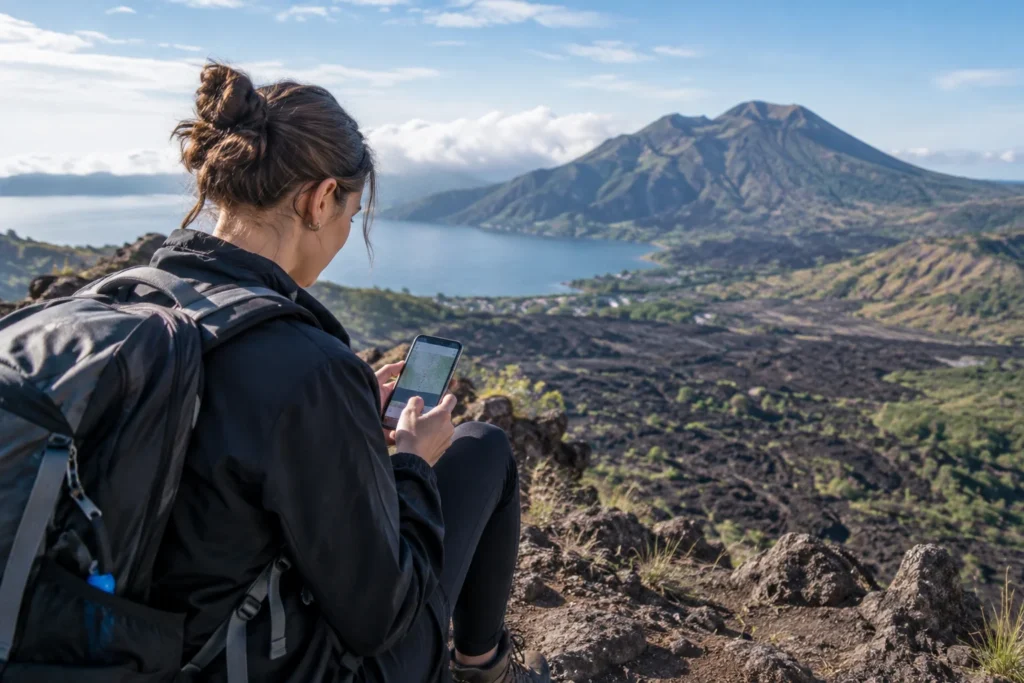
It is also worth checking that you know how to access your phone’s emergency calling screen. However, do not treat a mobile phone as a guaranteed emergency communication device in an area where reception may be weak. Your guide and the local operating arrangements remain important.
Can you upload sunrise photos from the summit?
Possibly, if you have a good connection at the exact spot and the network is performing well. But it is better to take your photos first and upload them later. A high-resolution photo or short video can take time to send over a weak connection, and repeatedly trying to upload files can drain your battery.
Use your phone camera normally, keep the lens clean, and avoid standing in an unsafe position just to find a stronger signal. The best photo is not worth stepping away from a safe viewing area or distracting yourself near a steep edge. If you want to share the sunrise immediately, try sending a small compressed image or wait until you return to a place with reliable Wi-Fi.
For camera settings, framing and practical viewpoint advice, see our guide to Mount Batur sunrise photography with a phone or camera. If you are hoping to capture the distant volcanoes, our article about seeing Mount Agung from Mount Batur at sunrise explains how visibility and weather can affect the view.
Should you buy a local SIM or eSIM for Mount Batur?
If you are visiting Bali from overseas, a local SIM or travel eSIM can make everyday travel easier. It can help with ride arrangements, maps, messaging and checking information while you are in areas with coverage. Choose a plan based on your wider Bali itinerary, not on a promise that one provider will work perfectly at every point on Mount Batur.
Before buying, check whether your phone supports eSIM if you plan to use one, whether the device is unlocked, how much data is included, and whether the plan allows hotspot use if you need it. If you choose a physical SIM, make sure you understand the registration requirements and keep your original SIM safely stored.
For a short trip, it may be easiest to arrange your data connection before the trek rather than trying to purchase a plan late at night or during an early pickup. Keep your booking and meeting details saved offline regardless of which provider you choose.
What if you lose signal during the trek?
Do not panic and do not wander away looking for a better signal. If you are trekking with a guide, stay with the group and follow the guide’s instructions. If you need to contact someone, tell your guide and wait for a suitable place where communication may be possible. Moving alone across unfamiliar terrain in darkness is not a sensible way to solve a phone problem.
Agree on a simple group plan before the walk begins. Know who the guide is, who is leading and who is following, and what to do if someone needs to stop. Keep the group together and let the guide manage route decisions. A phone can be helpful, but it should not become the main safety plan.
For official general travel information, Indonesia’s tourism authority publishes useful safety guidance for visitors to Indonesia, including emergency contact information. Save relevant local contacts before your trip and confirm current arrangements with your accommodation or tour operator. Emergency numbers and service availability can vary by location; do not assume a call will connect from every part of the mountain.
Phone etiquette and safety on Mount Batur
- Keep your attention on the trail. Stop in a safe place before checking messages or changing camera settings.
- Use a light carefully. Your phone torch can be a backup, but it should not replace the proper flashlight or headlamp recommended for the trek.
- Keep your device secure. Loose phones can slip from your hand on steep or rocky ground.
- Do not play loud audio. Keep the mountain experience peaceful for other visitors and listen for your guide’s instructions.
- Respect other people’s privacy. Ask before taking close-up photos or recording other trekkers.
- Take all rubbish with you. This includes packaging, tissues and any accessories you bring along.
- Do not chase signal bars. Never leave the group or a safe viewing area to find a better connection.
Is mobile reception important if you book a guided trek?
For most visitors joining a guided sunrise trek, mobile data is convenient rather than essential to the experience itself. Your operator should provide the relevant pickup or meeting instructions in advance, and your guide leads the activity on the mountain. You should still save the booking details and contact information before departure, because a last-minute message may not arrive if your connection is weak.
When you book, make sure the operator has the correct WhatsApp number and accommodation details. Read the confirmation carefully and ask questions before the activity rather than waiting until the pickup window. If you are meeting directly at a location instead of using hotel pickup, save the exact meeting point and allow enough time to arrive.
You can review the Mount Batur Sunrise Trekking price guide to compare the available trekking options, then check the details on the booking page. For a wider overview of the experience, visit the Mount Batur Sunrise Trekking homepage.
A simple offline phone checklist
| Before leaving | Why it helps |
|---|---|
| Download offline maps | Access saved road and area maps without mobile data |
| Screenshot booking details | Keep pickup and meeting information available |
| Save operator contact | Find the number without searching through messages |
| Charge phone fully | Keep enough battery for photos and communication |
| Pack a power bank | Useful for long travel days and heavy camera use |
| Download files in advance | Music, tickets or translation tools can be available offline |
| Tell your group your plan | Everyone knows who to follow if connectivity disappears |
Frequently asked questions
Is there 4G or 5G on Mount Batur?
It depends on your mobile provider, device, exact location and current network conditions. Do not assume that 4G or 5G will be available at every trail section or viewpoint. Check your operator’s coverage information and prepare for periods without data.
Can I use WhatsApp on Mount Batur?
WhatsApp can work when your phone has a usable data connection, but messages may not send or arrive in areas with weak reception. Save your booking details and important contact information before leaving your hotel.
Can I use Google Maps without internet?
Yes, Google Maps supports offline maps when you download the relevant area in advance. Offline maps have limitations, and they should not be used as a substitute for a guide or marked trekking route. Check Google’s official instructions before your trip.
Will my phone battery drain faster in the mountains?
Battery use depends on the device, temperature, screen brightness, camera use and signal conditions. A fully charged phone and a small power bank are sensible precautions for an early start.
Can I make an emergency call if there is no signal?
Do not assume that an emergency call will connect where ordinary service is unavailable. Emergency calling depends on network availability and local arrangements. Stay with your guide, follow the group’s safety plan and save relevant contacts before the trek.
Should I bring a separate camera instead of using my phone?
That is a personal choice. A phone is convenient for most visitors, while a dedicated camera may offer more control. Whichever you bring, keep it secure and prioritise safe footing over photography.
Do I need mobile data for a guided Mount Batur trek?
Usually not for the actual guided walk, but data is useful for travel arrangements and communication before and after the activity. Save the important details offline and confirm your pickup or meeting plan in advance.
Enjoy the sunrise, even when your phone is offline
Mobile reception around Mount Batur can vary, so the smartest approach is to prepare rather than expect a perfect connection. Download an offline map, save your booking details, charge your phone and keep your guide’s contact information accessible. Then put the screen away when the sunrise begins.
You came all this way for a volcano, a changing sky and a memorable morning—not to spend the best part of the view refreshing a social media app. Take your photos, enjoy the moment and upload them when you are back somewhere with a stronger connection.